
Two people can log the exact same hours and work in completely different ways. One holds a single document for an hour; the other touches fifteen apps in the same stretch. Both are working, both are busy, but the shape of their day is nothing alike. Most trackers flatten that into one number. Plouse doesn’t.
Two simple signals
Work styles come from just two things Plouse already watches, no timers, no tags, no extra input from you:
- How long you stay on one thing — are you settling into long stretches, or moving on every few minutes?
- How many tools you move between — are you living in one or two apps, or spreading across many?
Cross those two axes and a handful of recognisable rhythms fall out. Plouse names each one so the pattern is easy to see at a glance.
The six work styles
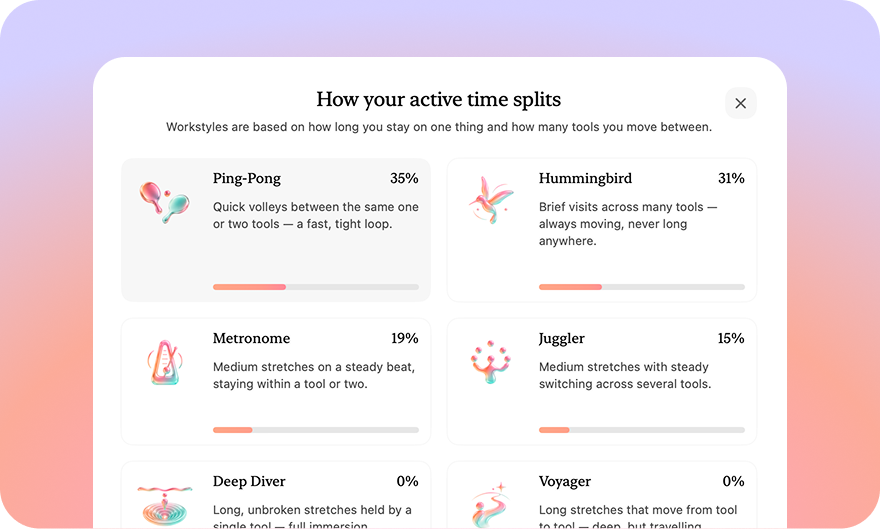
- Deep Diver — long, unbroken stretches held by a single tool. Full immersion.
- Voyager — long stretches that move from tool to tool. Deep, but travelling.
- Metronome — medium stretches on a steady beat, staying within a tool or two.
- Juggler — medium stretches with steady switching across several tools.
- Ping-Pong — quick volleys between the same one or two tools. A fast, tight loop.
- Hummingbird — brief visits across many tools. Always moving, never long anywhere.
No style is the “right” one
A designer lost in a three-hour Deep Dive and a support lead playing Hummingbird across a dozen threads are both doing exactly their job. Work styles aren’t a score to raise. They just make the rhythm of your day legible, so you can notice when it matches the work in front of you, and when a morning that was meant for deep work quietly turned into ping-pong.
Where to find it
Open Insights and look for How your active time splits. Pick any range, today, last week, the whole quarter, and you’ll see your mix across the six styles, with the share of time in each. Like everything in Plouse, it’s computed entirely on-device from your own activity. Nothing about how you work ever leaves your Mac.